← Back to Portfolio
Project · Billing Automation · Multi-System Integration

Invoice Management System — Monday.com + Xero + Make.com

An end-to-end invoice and bill management system with Monday.com as the central hub, Xero for accounting, and Make.com handling orchestration. PDF invoices land in an inbox; AI extracts the data; draft bills appear in Xero. Five Monday boards and four Make scenarios make it work, end to end.

Monday.com Xero Make.com OpenAI API Billing Automation Multi-System Sync
5
Connected Monday boards
4
Orchestrating Make scenarios
3
Integrated systems
1
Central hub of truth (Monday)

🎯 The Challenge

The client needed to manage vendor invoices — line items, suppliers, GL accounts, and bill creation in Xero — with minimal manual input. PDF invoices arrived by email and had to be extracted, mapped, and pushed into Xero accurately, without duplicates or rekeying. They also wanted clear visibility into what each automation was doing, including errors and exceptions, so managers could intervene without digging into raw logs.

Goals:
  • Manage vendor invoices, line items, suppliers, and GL accounts with minimal manual input
  • Extract structured data from PDF invoices and map it correctly
  • Keep Xero and Monday.com in sync for suppliers, items, and bills
  • Reduce duplicated data, manual errors, and back-and-forth between tools
  • Provide clear status feedback for every automation event — success, error, duplicate, etc.

🏗 The Architecture

The full pipeline in three nodes: PDF invoices arrive via email, get parsed and structured in Monday.com, then flow out as draft bills in Xero.

📧 Email Inbox → 📋 Monday.com → 💰 Xero
AI parses PDFs · 5 boards manage data · 4 scenarios orchestrate the flow

Inside Monday.com, five purpose-built boards handle the structured data with clear separation of concerns — one board per domain entity, all linked by relations.

Board 1
📋 Invoice Management
Central board for all invoice details. Used to initiate Xero bill creation and track statuses end-to-end.
Board 2
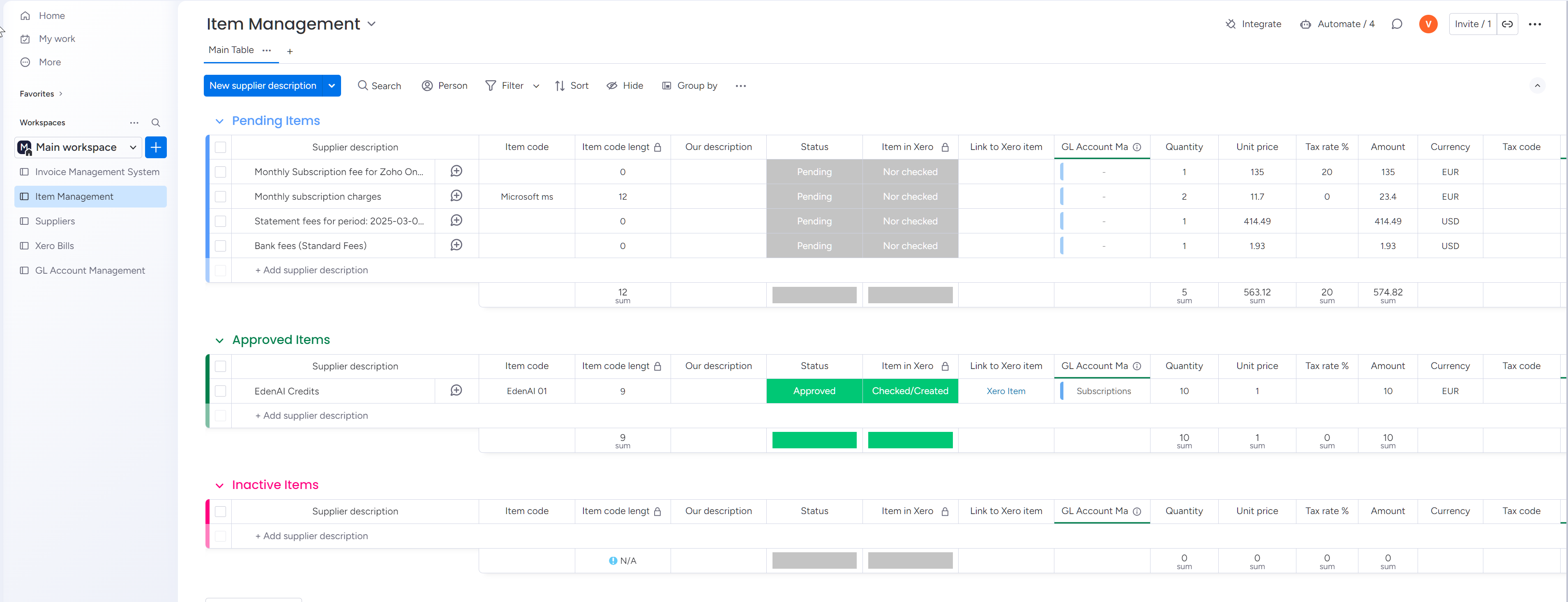
📦 Item Management
Stores invoice line items and links them to invoices and suppliers. Handles item codes and descriptions.
Board 3
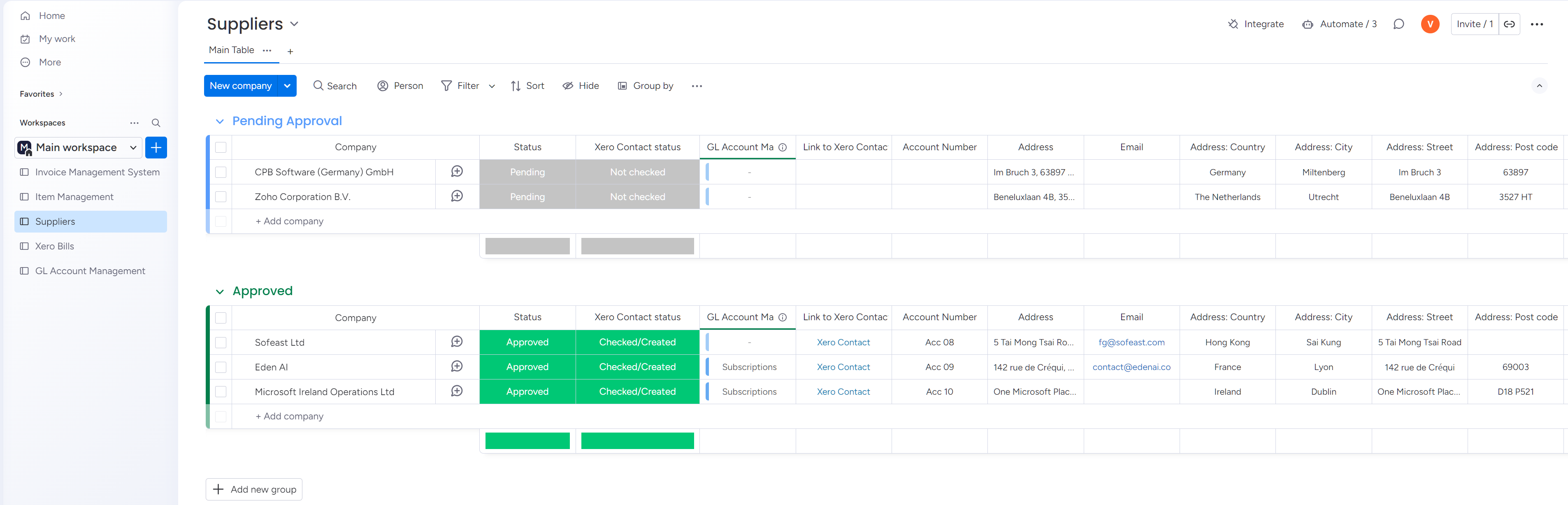
👤 Suppliers Directory
Tracks all vendor records and their sync status with Xero. The source of truth for "who we owe."
Board 4
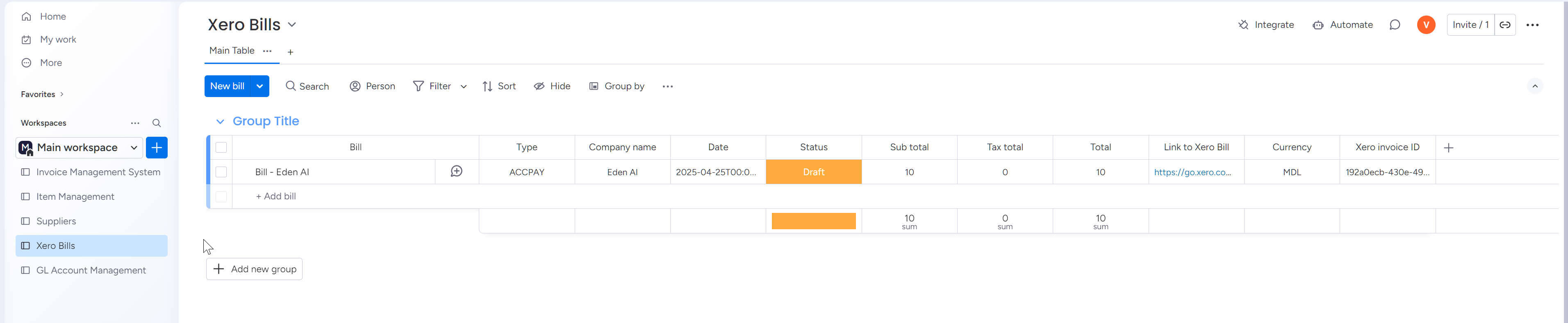
💰 Xero Bills
Logs draft bills created in Xero, including links back to Xero and to related Monday items.
Board 5
🏷 GL Account Management
Maintains Xero GL account codes to ensure correct coding for every item and bill.

🧩 The Automation Pipeline

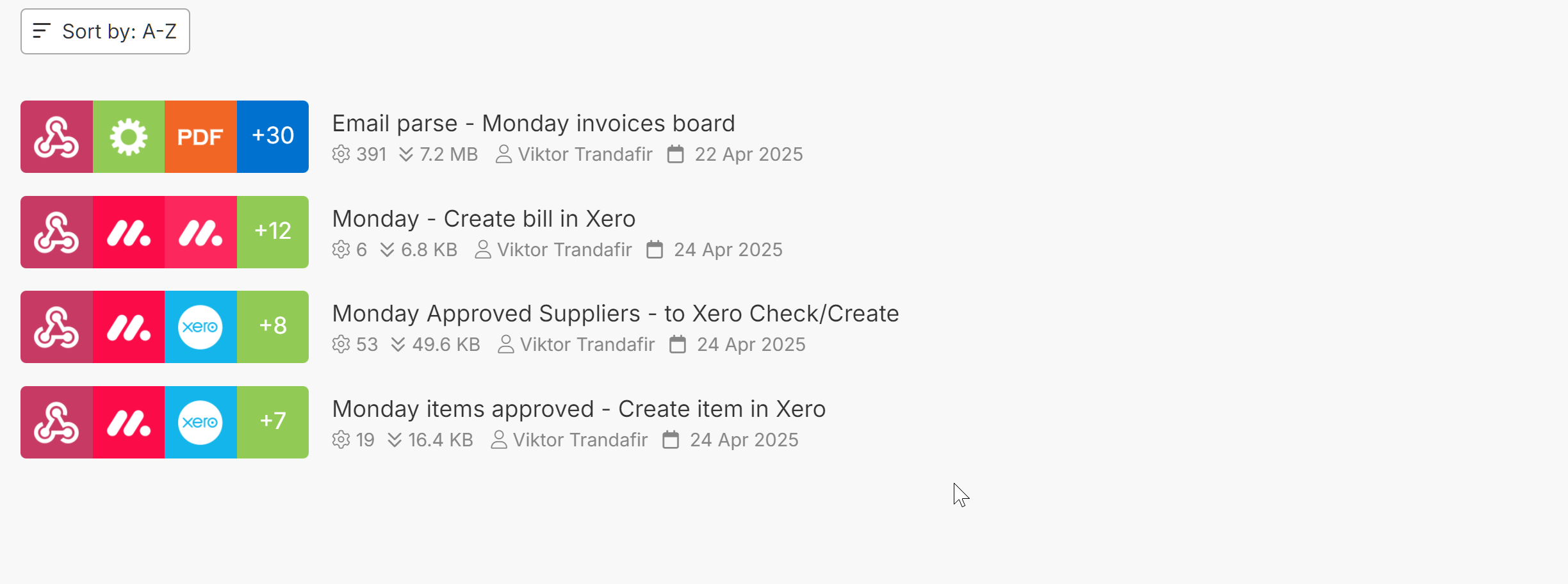
Four Make.com scenarios orchestrate the entire flow. Each one owns a single responsibility — parse, sync suppliers, sync items, or create the bill — so the system is easy to maintain and extend.

01
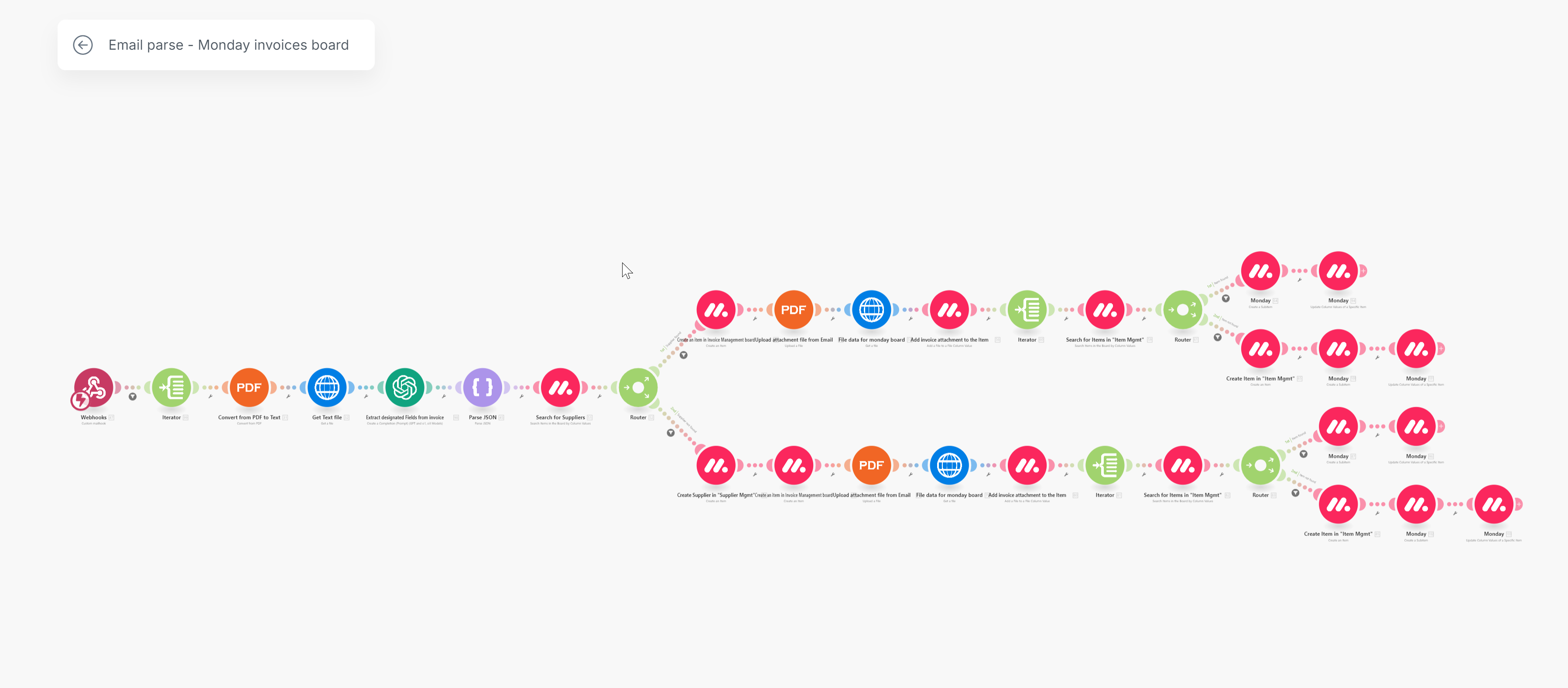
Email → Invoice Parser AI-powered
Scenario 1 listens to a dedicated email inbox for incoming PDF invoices. When one arrives, it:
  • Uses the OpenAI API to extract structured fields from the PDF (supplier, invoice number, date, totals, line items)
  • Searches for matching suppliers and items in Monday.com
  • Creates a new record in the Invoice Management board and related line items in Item Management
A PDF that arrived as raw email attachment is now a structured Monday record, ready for review.
02
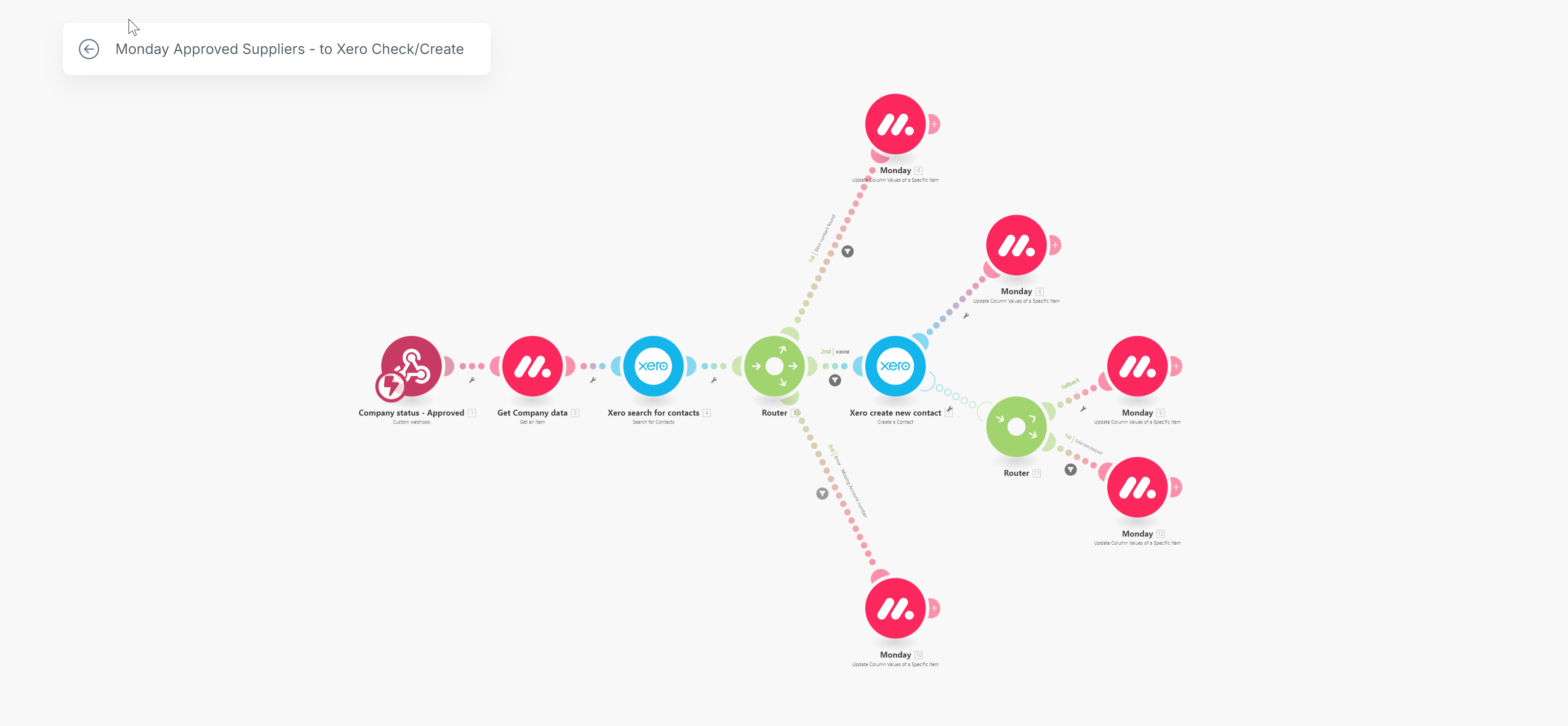
Supplier Sync — Monday ↔ Xero
Scenario 2 triggers when a supplier is approved in Monday.com:
  • Checks Xero to see if the supplier already exists
  • Creates a new contact in Xero if not found
  • Writes back the Xero IDs and statuses to the Suppliers Directory board
No more "which supplier record is the real one?" — Monday and Xero stay aligned automatically.
03
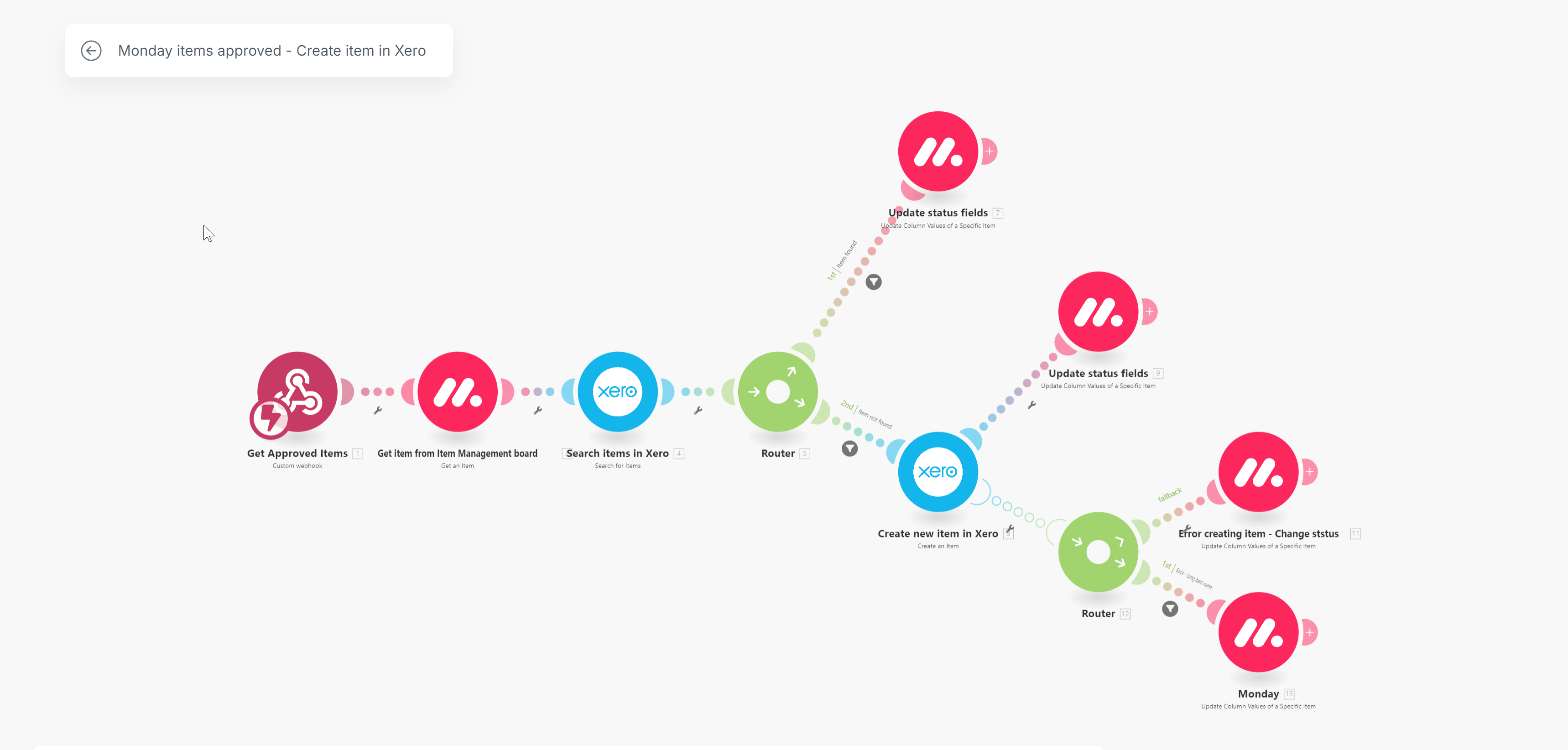
Item Sync — with duplicate detection
Scenario 3 handles the same logic for items:
  • Validates whether an item code already exists in Xero
  • Creates or updates items as needed
  • Detects duplicate codes and surfaces clear errors back into Monday — e.g. "Error — Item code already exists"
Managers fix issues from the Monday board, without ever leaving the interface.
04
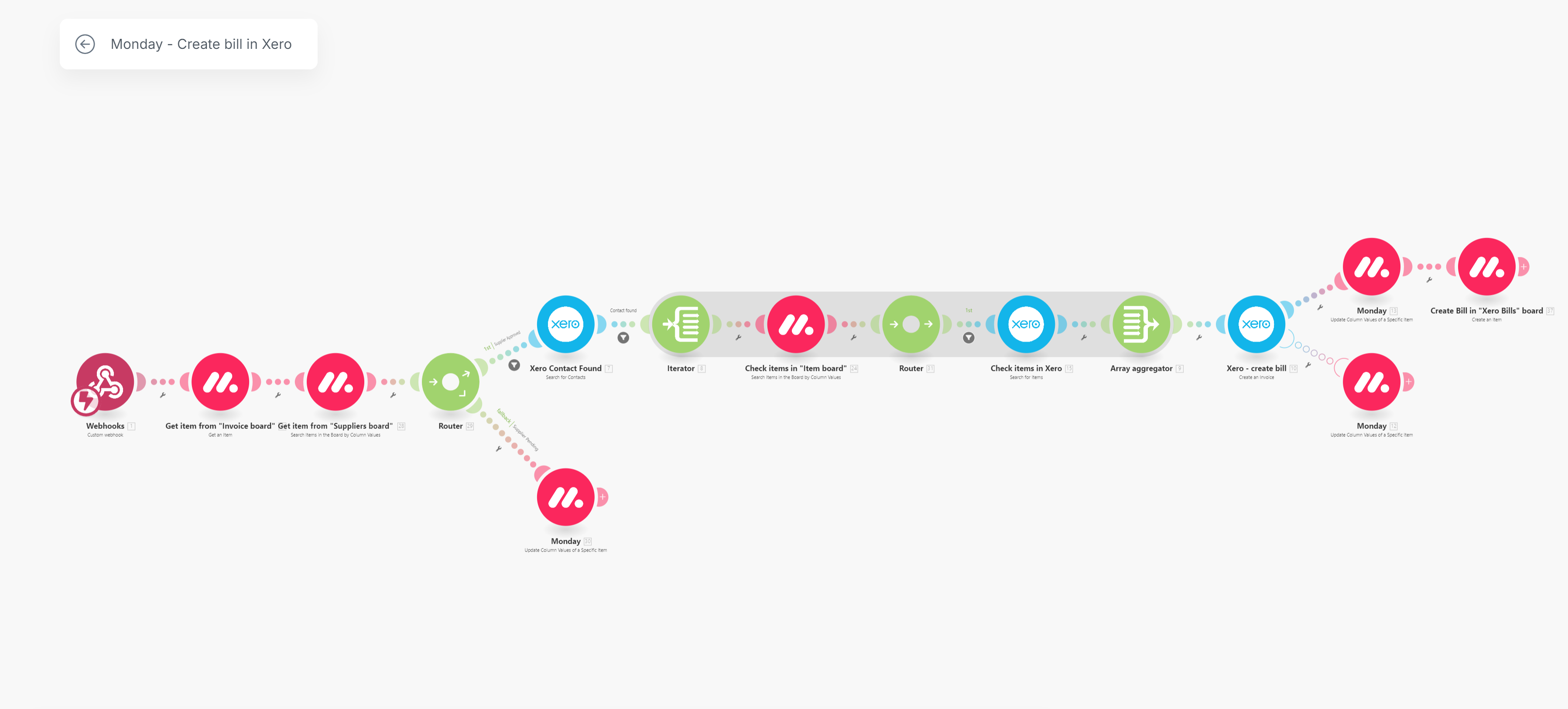
Bill Creation — Monday button to Xero draft
Scenario 4 triggers from a "Create Bill in Xero" button on the Invoice Management board. It:
  • Gathers validated supplier, item, and GL data from all related boards
  • Creates a draft bill in Xero with the correct lines, amounts, tax, and GL coding
  • Logs the result in the Xero Bills board with a direct link back to the bill in Xero
One button click; one draft bill ready for review in Xero.
🛡 Error handling & transparency
Every scenario returns human-readable status messages back into Monday.com. Errors, duplicates, and missing data are surfaced clearly — no digging through Make.com execution logs to find out why something failed. Managers see what happened and what to fix, right where they're already working.

🛠 Tools & Stack

Workflow & data
Monday.com — 5 connected boards, automations, relations, permissions, buttons
Orchestration
Make.com (Integromat) — 4 scenarios handling parse, sync, and bill creation
Accounting system
Xero — suppliers, items, draft bills, GL accounts
AI extraction
OpenAI API — structured field extraction from PDF invoices

📈 Results & Impact

  • Manual data entry slashed — invoice parsing, item creation, and supplier checks all happen automatically.
  • Errors & duplicates prevented — smart validation logic and two-way Xero sync catch issues before they propagate.
  • Faster processing times — invoices move from inbox to draft bill with minimal human effort.
  • High transparency — every automation step is logged with clear status messages and traceable workflows.
  • Manager-friendly control — approvals and exceptions are handled directly inside Monday.com, no Make.com expertise required.

🖼 Screenshots
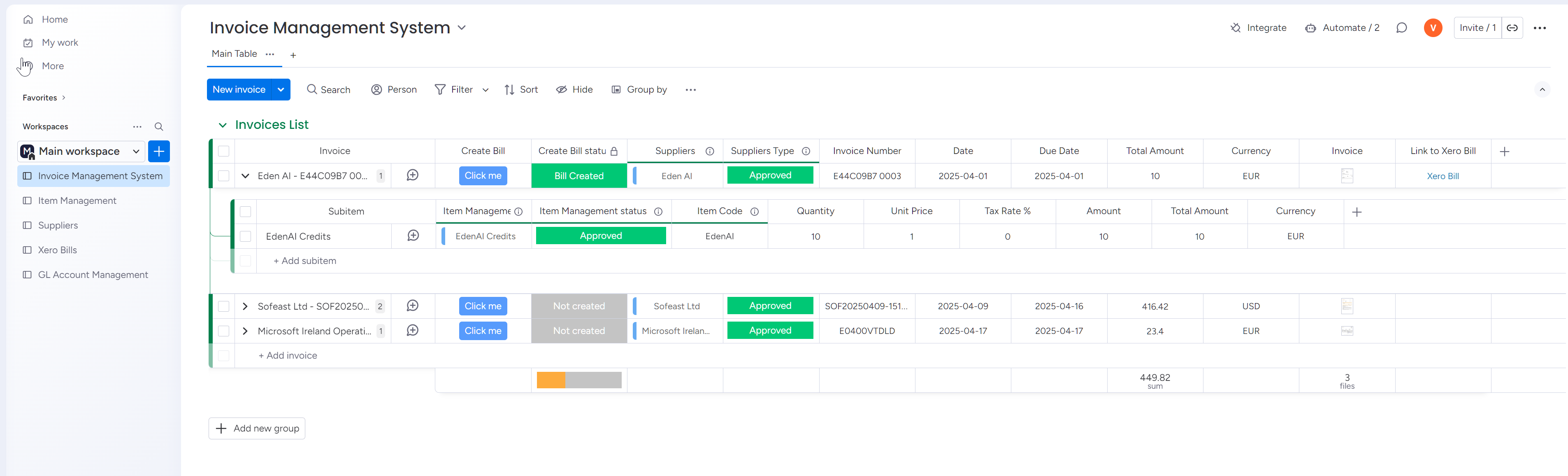
Monday Invoice Management board
Monday — Invoice Management board (the central hub)
Monday Item Management board
Monday — Item Management board
Monday Supplier Management board
Monday — Supplier Directory (synced with Xero)
Monday Xero Bills board
Monday — Xero Bills log with direct links to Xero
Make.com scenarios overview
Make.com — all four orchestrating scenarios
Email parse to Monday scenario
Scenario 1 — email parsing to Monday Invoices board
Monday items to Xero sync scenario
Scenario 3 — approved items create or update in Xero
Monday suppliers to Xero check/create scenario
Scenario 2 — approved suppliers check/create in Xero
Monday button creates bill in Xero scenario
Scenario 4 — create draft bill in Xero from Monday button
Need bills flowing from inbox to accounting, no rekeying?
The same pattern powers insurance premium billing, QuickBooks ↔ Monday reconciliation, supplier invoice automation, and any system where bills need to flow from email or operations into your accounting stack — with AI extraction, two-way sync, and clear error visibility for the people managing it.